LEGO filter for photos

AI LEGO Filter: Rebuild Your World in Bricks, Stay as You Are

Upload an everyday photo, indoors or out, with you, friends or a pet in it. The place around you is rebuilt in glossy plastic toy bricks, from the sidewalk to the sky, and pets are built from bricks too. People are meant to stay as photographed, so you appear as yourself in a brick-built world.

8 credits
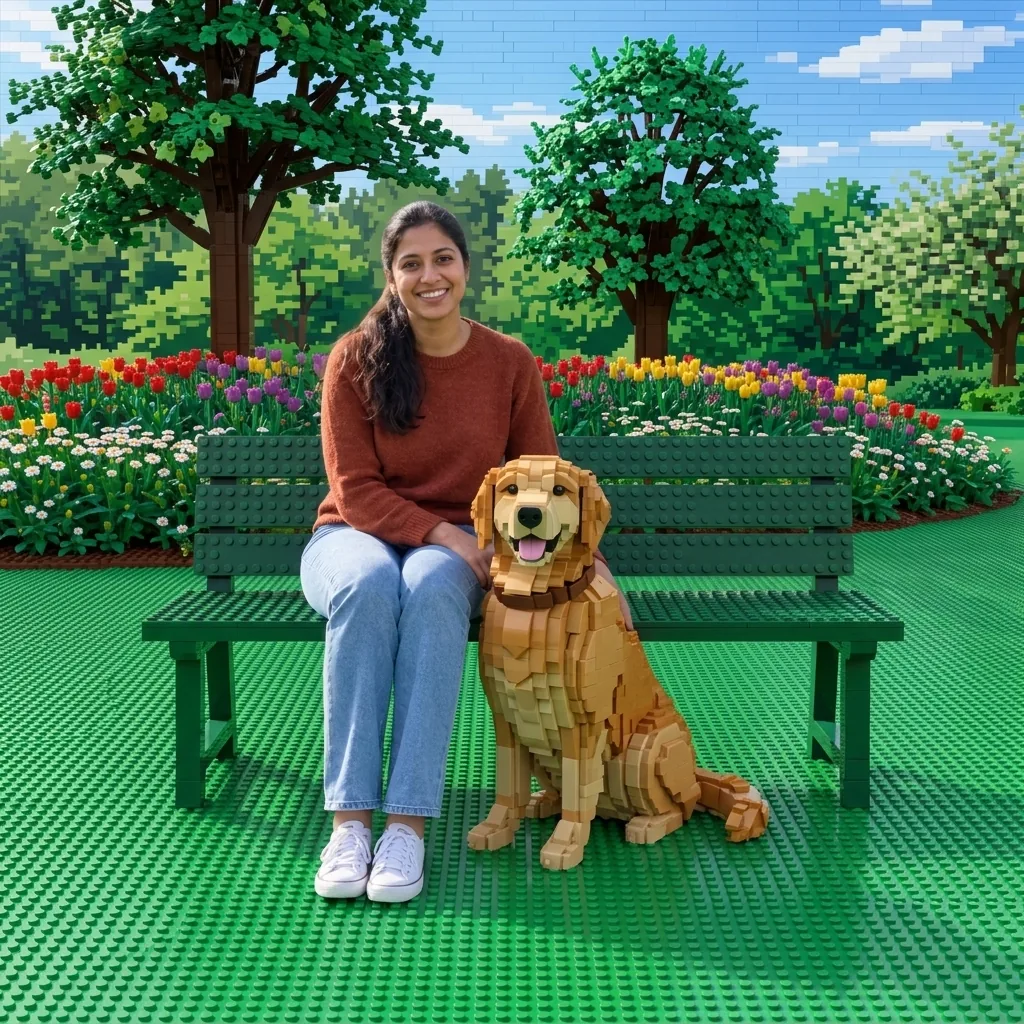
A smiling woman sits on a green park bench beside her golden retriever, with tulip beds and trees behind.
A smiling woman sits on a toy-brick bench beside a brick-built golden retriever on a studded green lawn, with brick trees behind.
Drag to compare the park photo with the same park, dog included, built from toy bricks.

LEGO filter examples created with GPT Image 2.5

LEGO-Style Photos Outdoors, Indoors and with Pets

  • A couple on a brick-built street
  • Two friends on a brick beach
  • A man at a brick-built cafe
  • A brick cat in the sun

How it works

How to Use the LEGO Filter on a Photo

  1. Step 1

    Pick a clear photo

    Choose a photo where faces are easy to see. If friends are in it, check that they agree.

  2. Step 2

    Skip the words, then generate

    The words field is optional; the filter works from your photo alone, so you can generate as soon as it has uploaded.

  3. Step 3

    Look closely, then download

    At full size, check each face against your original, then look the whole scene over. Not quite right? Generate again, since each try builds the scene anew. When you like it, download it.

The look

A Brick World Around Real People

Glossy bricks with round studs

The brick world is made of shiny plastic bricks and plates in many sizes, with rows of round studs on top, fine seams between bricks and curved pieces for rounded shapes.

What you wear stays real

Clothes, shoes, glasses and head coverings such as a hijab, kippah or headwrap are meant to stay real fabric and material, not bricks, and everyone keeps their pose and place in the picture.

Pets built from bricks

A dog or cat becomes a brick model of the same animal, with its coat pattern and eye color. Even a cat held in your arms is rebuilt in bricks while your arms stay real.

Photo ideas

Photos Worth Rebuilding in Bricks

Everyday photos work, and the more there is around you, the more there is to rebuild.

A street with houses and trees

Try a photo taken on a street. Townhouses, front walls and planters are rebuilt brick by brick, trees grow plastic leaves on brick trunks, and a bike can turn to bricks as well.

A room full of things

Try a photo at home or in a cafe with plenty around you. The sofa, rug, lamps, house plants and vases come back built from bricks, and so can cups and the view through the window.

A couple or friends outdoors

Try a photo of a couple or a few friends in a garden or by a river. Lawns become green studded plates, water turns to translucent blue bricks, and a riverside railing is rebuilt too.

Ways to use it

From Profile Pictures to Pet Birthdays

Posts and profile pictures

Share your street, your living room or your favorite cafe rebuilt in toy bricks, with you still in the picture.

Cards for a toy-brick fan

Make a birthday card for a friend who loves toy bricks, with their own street rebuilt around them.

Travel photos

Rebuild a city street or a riverside walk from your trip in bricks and send it to the friends who came along.

Pet birthdays

Post your brick-built dog or cat on its birthday or on the anniversary of the day it came home.

Create more with one YouArt membership

This generator uses 8 credits for one 1K image. Membership credits work across YouArt image, video, audio, and workflow tools.

Basic

For hobbyists and explorers

$9.99/mo
Select Plan
  • 1000 credits
  • Up to ~200 images/month
  • Up to ~332s video/month
  • Intelligent creative agent
  • Video editor
  • Latest image models, including GPT Image 2.5, GPT Image 2 and Nano Banana Pro
  • Latest video models, including Seedance 2
  • Realistic face uploads
  • Voice generation with ElevenLabs
  • No watermark
  • Unlimited template access

Pro

Popular

For creators and pro users

$29.99/mo
Select Plan
  • 3300 credits
  • Up to ~1000 images/month
  • Up to ~1100s video/month
  • Intelligent creative agent
  • Video editor
  • Latest image models, including GPT Image 2.5, GPT Image 2 and Nano Banana Pro
  • Latest video models, including Seedance 2
  • Realistic face uploads
  • Voice generation with ElevenLabs
  • No watermark
  • Unlimited template access

Max

Best Value

For power users and teams

$149.99/mo
Select Plan
  • 18000 credits
  • Up to ~6000 images/month
  • Up to ~6000s video/month
  • Intelligent creative agent
  • Video editor
  • Latest image models, including GPT Image 2.5, GPT Image 2 and Nano Banana Pro
  • Latest video models, including Seedance 2
  • Realistic face uploads
  • Voice generation with ElevenLabs
  • No watermark
  • Unlimited template access

Team

For teams and studios

$329.99/mo
Select Plan
  • 36300 credits
  • Up to ~12000 images/month
  • Up to ~12100s video/month
  • Realistic face uploads
  • Share canvas, workflows, and assets with your team
  • Up to 10 members per team
  • Up to 5 teams
  • Role-based management
  • Team credit management and spending caps
  • Per-member usage tracking

Questions answered

AI LEGO Filter FAQ

No. The filter builds the world around people, not the people themselves, who are meant to keep their own faces and bodies. LEGO is a trademark of the LEGO Group, which does not sponsor, authorize or endorse this site and is not affiliated with YouArt; the name describes the visual style, and the results are not LEGO products.

Build beyond one image

Turn your result into a complete creative workflow

Open YouArt's visual canvas to connect generation, editing, upscaling, animation, and sound in one reusable process.