Halloween background changer

Add Halloween Background to Photo: Change the Scene, Keep Your Costume

Start with a photo of yourself, friends or a pet, whether you are in costume or everyday clothes. The place behind you becomes a Halloween scene: by default a front porch with carved jack-o'-lanterns, or pick a pumpkin patch in daylight, a haunted house or a misty graveyard at dusk.

Choose a Halloween scene

Your choice is sent along with anything you type. One scene at a time; tap your choice again to clear it. With Pumpkin patch, a blurry scarecrow-like shape can sometimes appear far behind you.

8 credits
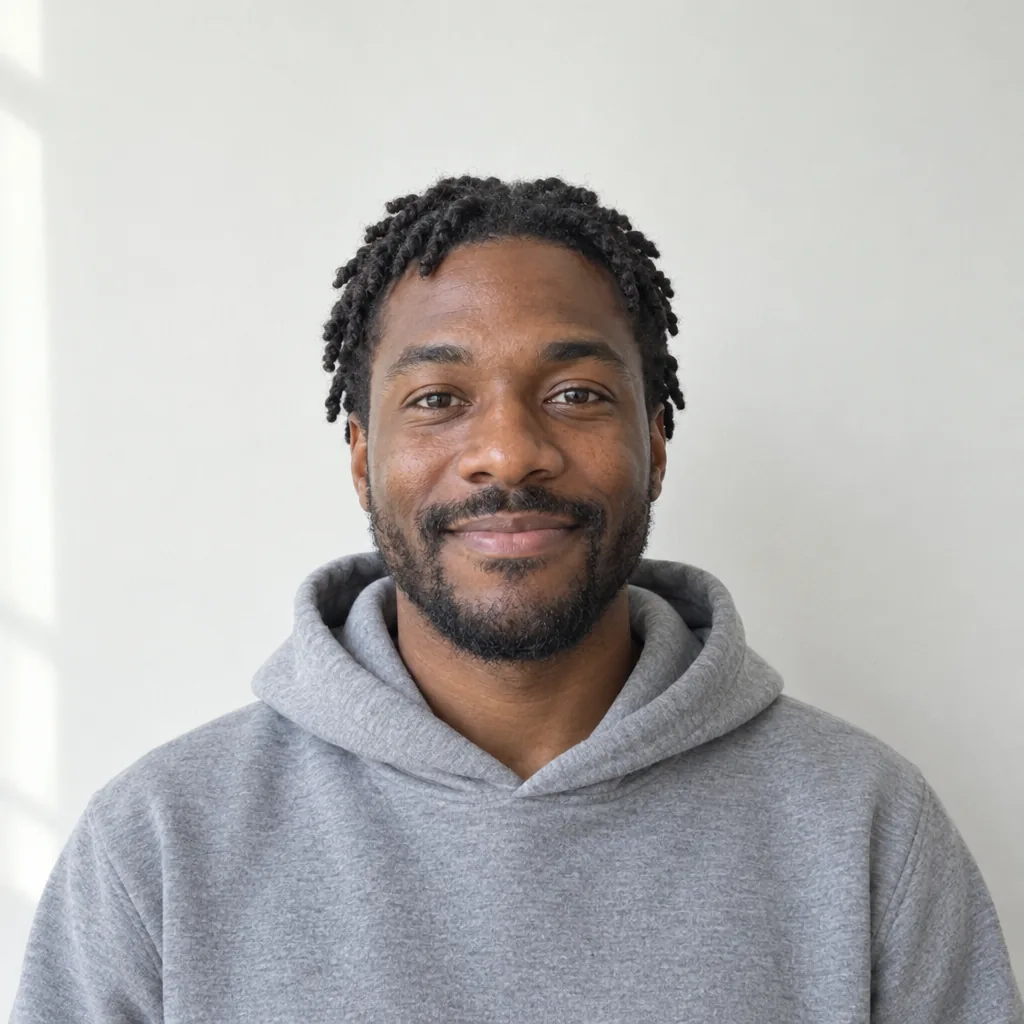
A smiling man with deep brown skin, short twists and a beard, wearing a gray hoodie against a plain white wall.
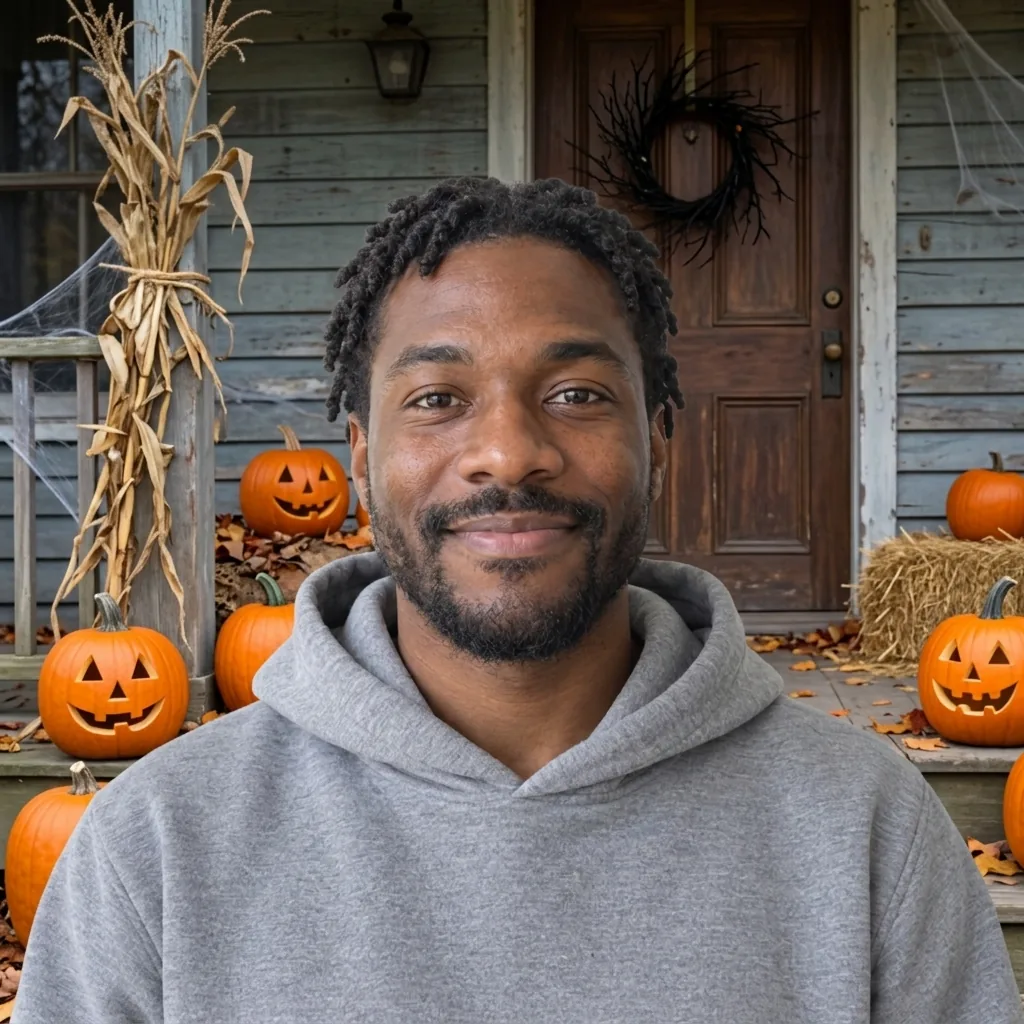
A smiling man in a gray hoodie in front of a Halloween porch with jack-o'-lanterns, corn stalks, hay and a twig wreath.
Drag to see the same photo with and without its Halloween setting.

Groups, couples, selfies and pets

Halloween Filter Examples: AI Halloween Photos in Four Scenes

  • Costumed couple at a haunted house
  • Three friends in a pumpkin patch
  • A selfie at a misty graveyard
  • A black cat by the porch

How it works

How to Add a Halloween Background to a Photo

  1. Step 1

    Start with a clear photo

    Use a sharp photo of yourself, your pet, or friends who are happy to be in it. Plain or indoor backgrounds work best: outdoors, a railing right behind you can stay in the picture.

  2. Step 2

    Set the scene

    Tap a scene or describe your own, or leave both empty for the Halloween porch. Then generate.

  3. Step 3

    Look it over, then download

    At full size, compare each face with your photo and check that no scenery covers anyone, such as a shoulder at the edge or decorations in front of a group. Something wrong? Generate again.

The look

The Porch, Your Costume and Your Friends

A porch dressed for Halloween

Behind you stand a wooden wall and a front door hung with a wreath of bare black twigs, with carved jack-o'-lanterns, their candles unlit, pumpkins, a hay bale and dried corn stalks, all in soft autumn daylight.

Your costume, as you wore it

Only the setting is meant to change, so a costume, hat, face paint or makeup you already have on stays as it was, along with faces, hair, glasses, a hijab, clothes and pose.

Couples and groups

From a couple to a group of five, each person is meant to keep their place, in the same order, with pumpkins, hay bales and fences set behind and between people, not in front of anyone.

Prompt ideas

Beyond the Porch: Three Halloween Scenes

Describe only the place you want, or choose one of these three scenes at the top of the page.

A pumpkin patch in daylight

Try "Pumpkin patch" for rows of orange pumpkins lying on straw, a few hay bales, a red wooden barn and trees in autumn colors behind you.

A haunted house at dusk

Try "Haunted house" for a dark Victorian house just after sunset, the sky still a soft blue, with a pale moon, low mist, lit windows and glowing jack-o'-lanterns.

A misty graveyard at dusk

Try "Misty graveyard" for an old iron gate and fence standing behind you, with low mist, glowing jack-o'-lanterns and a few weathered headstones.

Ways to use it

From Costume Photos to Party Invitations

Costume photos

Took your costume photo against the hallway wall? Put a haunted house or a misty graveyard behind you before you share it with friends.

Party invitations

Start a Halloween card, party invitation or event poster with a photo of the hosts in a pumpkin patch or on a jack-o'-lantern porch.

October profile pictures

Give your usual profile picture a jack-o'-lantern porch or a pumpkin patch for October, then change back in November.

Pet photos

Put pumpkins and hay bales behind your dog or cat without carrying a single one home.

Create more with one YouArt membership

This generator uses 8 credits for one 1K image. Membership credits work across YouArt image, video, audio, and workflow tools.

Basic

For hobbyists and explorers

$9.99/mo
Select Plan
  • 1000 credits
  • Up to ~200 images/month
  • Up to ~332s video/month
  • Intelligent creative agent
  • Video editor
  • Latest image models, including GPT Image 2.5, GPT Image 2 and Nano Banana Pro
  • Latest video models, including Seedance 2
  • Realistic face uploads
  • Voice generation with ElevenLabs
  • No watermark
  • Unlimited template access

Pro

Popular

For creators and pro users

$29.99/mo
Select Plan
  • 3300 credits
  • Up to ~1000 images/month
  • Up to ~1100s video/month
  • Intelligent creative agent
  • Video editor
  • Latest image models, including GPT Image 2.5, GPT Image 2 and Nano Banana Pro
  • Latest video models, including Seedance 2
  • Realistic face uploads
  • Voice generation with ElevenLabs
  • No watermark
  • Unlimited template access

Max

Best Value

For power users and teams

$149.99/mo
Select Plan
  • 18000 credits
  • Up to ~6000 images/month
  • Up to ~6000s video/month
  • Intelligent creative agent
  • Video editor
  • Latest image models, including GPT Image 2.5, GPT Image 2 and Nano Banana Pro
  • Latest video models, including Seedance 2
  • Realistic face uploads
  • Voice generation with ElevenLabs
  • No watermark
  • Unlimited template access
Team

For teams and studios

$329.99/mo
Select Plan
  • 36300 credits
  • Up to ~12000 images/month
  • Up to ~12100s video/month
  • Realistic face uploads
  • Share canvas, workflows, and assets with your team
  • Up to 10 members per team
  • Up to 5 teams
  • Role-based management
  • Team credit management and spending caps
  • Per-member usage tracking

Questions answered

Add Halloween Background to Photo FAQ

It is meant to stay as photographed, with the scene lit around the light in your own photo. In daylight scenes a face can look slightly rosier, and against a dusk sky your own light can look like a flash photo.

Build beyond one image

Turn your result into a complete creative workflow

Open YouArt's visual canvas to connect generation, editing, upscaling, animation, and sound in one reusable process.