Beard filter

Beard Filter: See a Beard on Your Own Face Before You Grow It

Upload a photo and name a style — full, short boxed, stubble, goatee, van dyke, moustache alone, mutton chops — and the facial hair arrives in your own hair's colour, coarseness and curl, growing out of a beard line along your cheek rather than stopping at a drawn edge. Everything else stays put: your face shape, your jawline, your skin, your expression, the hair on your head, your clothes, the light and the room. Ask for a clean shave instead and it takes the facial hair off and rebuilds the skin underneath, so the page works in both directions.

8 credits
A short full beard, named in the prompt. Attach a photo and only the facial hair changes.

Beard filter examples

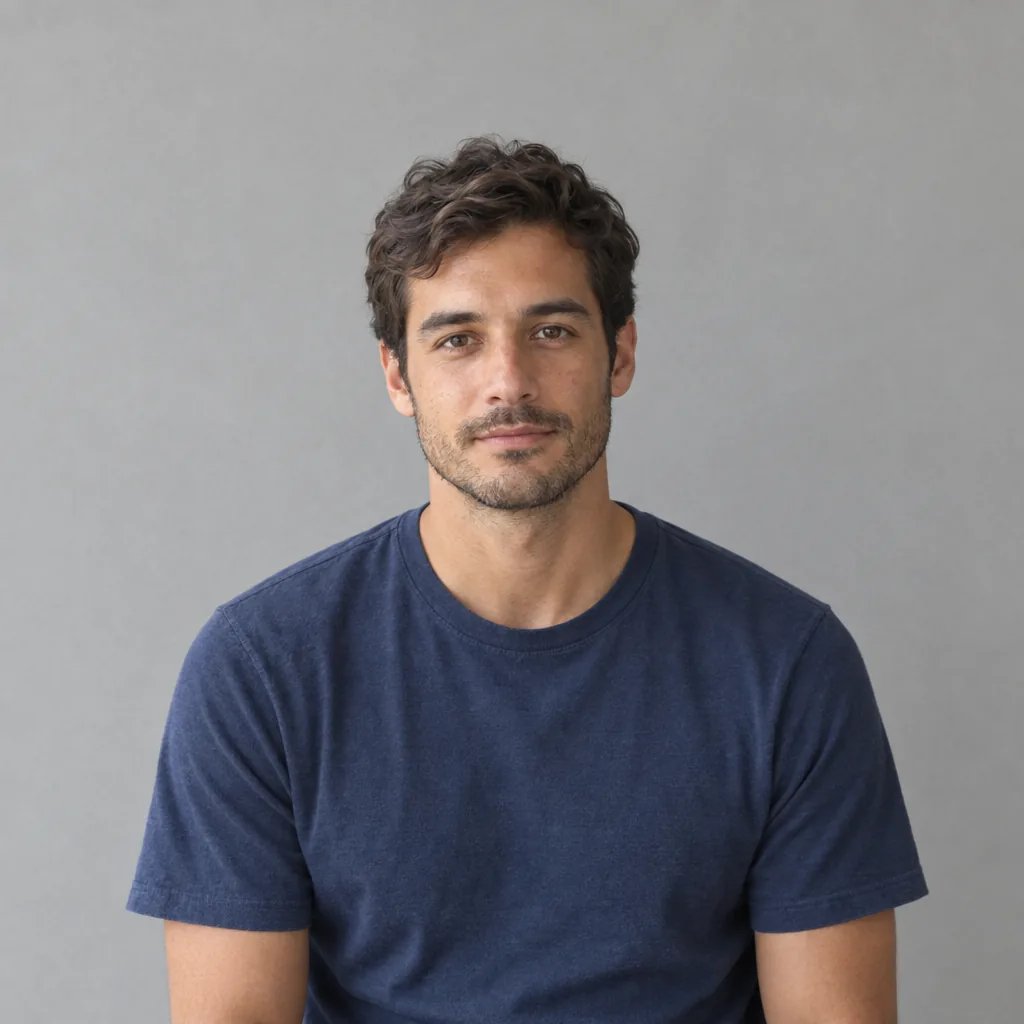
Full Beard, Stubble, Goatee and Moustache on Four Faces

  • Full beard — what you get when you name no style
  • Stubble — the length where a fake beard line shows
  • Goatee — chin and moustache joined, cheeks bare
  • Moustache alone — nothing on the chin or jaw

How it works

Add a Beard to Your Photo in Three Steps

  1. Step 1

    Upload a photo of your face

    A clear front-facing shot with your jaw, chin and neck visible works best — that is where the beard has to grow from, and the edge is where a fake one gives itself away. Glasses, a hat or a hand near your chin all make that line harder to place. Without a photo the generator invents a person instead, which is fine for browsing styles but tells you nothing about you.

  2. Step 2

    Name the style

    Full beard, short boxed, stubble, goatee, van dyke, moustache alone or mutton chops, plus the length and any grey. Name nothing and you get a neatly trimmed short full beard in your own hair colour. YouArt returns one 1K square photograph for 8 credits.

  3. Step 3

    Compare before you commit

    Each run gives you one photograph, not a before-and-after split, so run the same photo twice — stubble and a full beard, say — and put the two side by side on your screen. A beard is a three-month decision, and an afternoon of looking at it costs you nothing but the credits.

What the filter changes

Why the Beard Filter Reads as Your Own Hair

It grows from a beard line

The edge is where pasted-on facial hair fails. Here individual hairs break across the cheek line instead of stopping at a drawn border, the growth is denser along the jaw and chin and thins toward the cheekbone, it follows the direction hair actually grows on the jaw, neck and upper lip, and it throws the soft shadow real facial hair throws. At the edges you can still see skin through the hair.

Your hair's colour and coarseness

The beard is matched to the hair on your head — its colour, how coarse it is, how much it curls — rather than being a dark shape laid over your chin. The photograph stays unretouched around it: real pores, catchlights in the eyes, no beauty smoothing, because a smoothed face wearing a beard is not a preview of anything. Ask for grey at the chin, or a colour that differs from your head hair, and you get that instead.

Name the style and it holds

Full beard, short boxed beard, stubble, goatee, van dyke, moustache alone, mutton chops, or just a length in weeks or inches. Ask for a clean shave and it goes the other way, removing the facial hair and rebuilding the skin underneath. Either way the rest of the picture is left alone: no change to face shape, jawline, age, weight or features.

Prompt ideas

Name the Style, the Length and the Cheek Line

"Beard" on its own gets you the default — a neatly trimmed short full beard in your own hair colour. Name the style, then pin the length against something real: a week of stubble, half an inch, jaw-length. And say where the cheek line should sit, high and softly faded or low and left alone, because that one line changes the whole face.

A full beard, with the cheek line pinned

A neatly trimmed short full beard in my own hair colour, dense along the jaw and chin, with the cheek line kept high and softly faded rather than shaved into a hard edge.

Stubble, by how long you have left it

About two weeks of even stubble across the jaw, chin and upper lip, short enough that the skin still shows through, with a little grey coming in at the chin.

Or the other direction

Clean shaven — take the facial hair off and rebuild the skin underneath, so you can see the jaw under the beard you already have.

Ways to use it

Before the Razor, and Before the Three Months

Before three months of growing

Facial hair is slow. A full beard is a season of looking half-finished before you know whether you even like it, and this is the cheapest available look at the destination — as long as you read it as a look you are considering rather than a forecast of your own growth.

Something to show your barber

A picture of your own face wearing the shape you are after is a better conversation than a saved photo of a model whose hair is nothing like yours. Bring it as a reference, not an order sheet: a barber can only shape hair you have actually grown.

Keep the one you like

The result is a 1K square photograph, so a version you are happy with works as a profile picture straight away — square is the shape most avatars want anyway.

Put it to a vote

Run one photo through several styles and show people the set. The comparison only means anything because your face is identical in all of them, so the facial hair is the only thing anyone is actually voting on.

Create more with one YouArt membership

This generator uses 8 credits for one 1K image. Membership credits work across YouArt image, video, audio, and workflow tools.

Basic

For hobbyists and explorers

$9.99/mo
Select Plan
  • 1000 credits
  • Up to ~200 images/month
  • At least ~1000s video/month
  • Intelligent creative agent
  • Video editor
  • Latest image models, including GPT Image 2 and Nano Banana Pro
  • Latest video models, including Seedance 2
  • Realistic face uploads
  • Voice generation with ElevenLabs
  • No watermark
  • Unlimited template access

Pro

Most Popular

For creators and pro users

$29.99/mo
Select Plan
  • 3300 credits
  • Up to ~1000 images/month
  • At least ~3300s video/month
  • Intelligent creative agent
  • Video editor
  • Latest image models, including GPT Image 2 and Nano Banana Pro
  • Latest video models, including Seedance 2
  • Realistic face uploads
  • Voice generation with ElevenLabs
  • No watermark
  • Unlimited template access

Max

For power users and teams

$149.99/mo
Select Plan
  • 18000 credits
  • Up to ~6000 images/month
  • At least ~18000s video/month
  • Intelligent creative agent
  • Video editor
  • Latest image models, including GPT Image 2 and Nano Banana Pro
  • Latest video models, including Seedance 2
  • Realistic face uploads
  • Voice generation with ElevenLabs
  • No watermark
  • Unlimited template access

Team

For teams and studios

$329.99/mo
Select Plan
  • 36300 credits
  • Up to ~12000 images/month
  • At least ~36300s video/month
  • Realistic face uploads
  • Share canvas, workflows, and assets with your team
  • Up to 10 members per team
  • Up to 5 teams
  • Role-based management
  • Team credit management and spending caps
  • Per-member usage tracking

FAQ

Beard Filter FAQ

What is the beard filter?
It is a one-photo try-on for facial hair. You attach a picture of your face, name the beard you want — or name nothing and get a neatly trimmed short full beard in your own hair colour — and you get back a single photograph of yourself wearing it. What makes it worth looking at is what it leaves alone: your face shape, jawline, age, weight, skin, eyes, expression, head hair, clothing, lighting and background all come back as they were, so the only difference between the photo you uploaded and the one you get is the hair on your face.
Will my beard actually grow in like this?
No, and this page cannot tell you whether it will. What you are looking at is a beard drawn onto your photo, not a reading of your own growth. It has no way of knowing how densely you grow, where you grow patchily, how long the gaps take to close, or which way the hair sits on your neck and jaw, because none of that is visible in a photograph of a clean-shaven face. Facial hair is personal: plenty of people never fill in along the cheeks, get a thin patch at the corners of the mouth or under the lower lip, come in much greyer or much redder than the hair on their head, or simply grow slowly and unevenly for the first couple of months. So the image shows a beard you might grow, not the one you will. Do not book a barber on the strength of it, and do not commit to months of growing because of it. The only way to find out what your beard does is to stop shaving and watch.
Can it take a beard off instead of adding one?
Yes — ask for clean shaven and the facial hair is removed and the skin underneath rebuilt, which is the "no beard filter" half of this page. Be clear about what that means: the skin under a beard has never been photographed, so it is invented rather than recovered. A paler jaw from years of cover, a scar, a tan line, an uneven chin — the result knows about none of it and will give you smooth, even skin instead. It is a fair look at the shape of your bare jaw; it is not a photograph of your bare face.
Can I use my own photo?
Yes, and it is the only way this page is worth using. Attach a clear front-facing photo and the facial hair is added to your own face while your features, skin, expression, head hair, clothing and background stay as they were, with no change to your face shape, jawline, age or weight; widening the jaw or ageing the face is not part of the job. One thing to be clear about: it is a new image built from your photo rather than an edit of the file you uploaded, so look at the result properly before you rely on it.
How many credits does one beard try-on cost?
Each run costs 8 credits and returns one 1K square image. Trying a full beard, stubble and a goatee on the same photo is three separate runs, so 24 credits. New accounts start with credits to spend, and membership credits work the same way here as anywhere else on YouArt.

Keep exploring

More AI art styles to try

The closest looks to this one. Each is a full generator with its own prompt studio and examples.

Browse all 51 AI generators

Build beyond one image

Turn your result into a complete creative workflow

Open YouArt's visual canvas to connect generation, editing, upscaling, animation, and sound in one reusable process.